
How to design a signature that feels like you
Compare real full-name, initial-and-surname and initials exports. Build a readable design you can comfortably repeat.
Start with how much of your name to include
A full name, an initial with a surname, and initials alone give you three different starting shapes. The examples below use the same Allura font and ink settings in the free signature maker. Only the name changes.
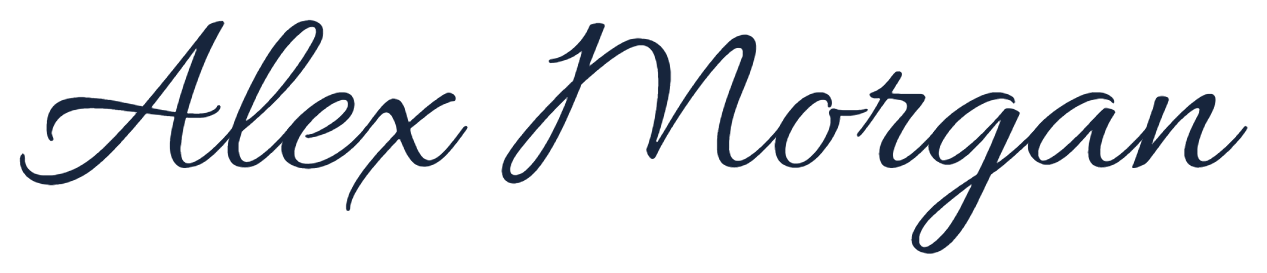
The longest form gives each part of the name room to be recognizable.
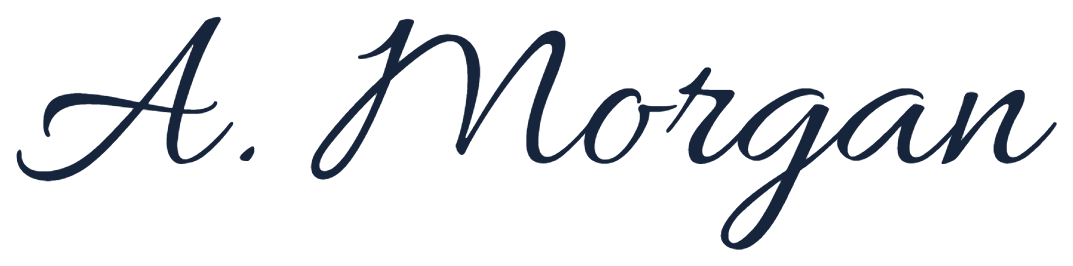
A shorter opening keeps the surname prominent and reduces the overall length.
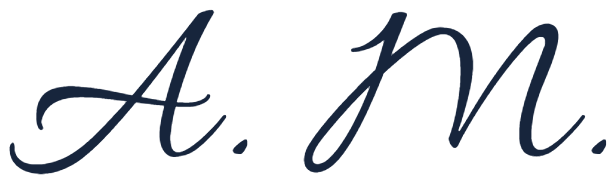
A compact mark puts more emphasis on the shapes and balance of the capitals.
Real transparent PNG exports · Font: Allura · Fictional name · Images scaled to fit the comparison.
Choose the form that suits where you will use it. For a small space, an initial and surname may fit more comfortably. For a personal website, the full name may be easier to recognize. Check any document’s naming requirements before shortening your name.
Build a design in five small steps
- Write your usual signature first. Make five quick attempts on plain paper. Notice the shapes your hand already produces comfortably: the first capital, slant and final stroke.
- Compare the three name formats. Open the free signature maker and enter each version. Keep one font selected while comparing so you can judge the name format itself.
- Pick one direction. Compare the eight fonts for a quieter, rounder or more expressive shape. With AI designs, inspect every letter before deciding a style works.
- Choose one personal detail. Try a larger first capital, a more open join or a shorter ending. Change one thing at a time so it is easy to see whether the result improves.
- Check the actual use size. Place the PNG in a draft document or website layout. A flourish that looks attractive in a large preview may crowd the letters when reduced.
Choose the tool that fits the result
Fonts offer quick comparisons. Draw captures your own hand movement. Live SVG composes animated handwriting from original pen strokes. Creative combines a name with an illustration, which may work better as a personal visual mark than as something to copy with a pen.
Try the ten-signature check
Write your chosen version ten times at a normal, comfortable pace. Keep the overall opening, proportions and ending in mind. You do not need to match every loop perfectly.
- If you keep stopping at one flourish: shorten it or replace it with a movement you already use.
- If neighboring letters merge: leave a small gap or open the loop so you can read the name at normal size.
- If the signature keeps getting wider: shorten the name format or reduce long joins between letters.
Circle the attempt that was easiest to write. Use it as the starting point for your next practice session.
Keep a digital copy and a practice copy
Download a transparent PNG for documents. For a scalable digital image, Live and completed AI designs also provide SVG. Use the Practice button beside your result to bring that exact design into an A4 or Letter sheet.